Globe Studio Review: Cinematic Globe Animations Without 3D Software
TL;DR — Globe Studio by Frametools is a standalone macOS application that creates cinematic globe animations with flight arcs, country highlights, and smooth camera movements. Globe Studio requires no 3D experience, costs $19.99 as a one-time purchase, and exports up to 4K resolution in H.264, H.265, or VP9 format.
Creating professional globe animations traditionally requires After Effects templates, Cinema 4D, or Blender — tools with steep learning curves and render times measured in hours. Globe Studio by Frametools eliminates that complexity entirely. This review covers every feature of Globe Studio based on the official product demonstration, including the storyboard editor, customization options, export capabilities, and pricing.
What Is Globe Studio?
Globe Studio is a standalone desktop application for macOS that generates cinematic 3D globe animations. The software handles the entire workflow from location placement to final video export in a single interface. Globe Studio does not require After Effects, Blender, Cinema 4D, or any other 3D software.
The core value proposition of Globe Studio is speed. Traditional globe animations in After Effects require 1 to 3 hours for a basic 10-second map zoom animation. Globe Studio compresses that workflow to minutes because the entire rendering pipeline runs locally without frame-by-frame compositing.
Who Is Globe Studio For?
Globe Studio targets six primary user groups: content creators producing travel vlogs and channel intros, journalists visualizing conflict maps and migration data, businesses showing global presence and supply chains, travel bloggers creating route animations, presenters building keynotes and pitch decks, and educators teaching geography or history.
The common requirement across all these groups is the need for professional globe visuals without investing weeks into learning 3D software. Globe Studio addresses that requirement by providing a point-and-click interface with real-time preview.
How Does the Storyboard Editor Work?
The Globe Studio storyboard editor uses a stop-based system for building animations. Users click "Add Stop" to create a new location pin, then click directly on the 3D globe to place the pin at the desired position. Each stop includes fields for a label, subtext, and individual camera settings.
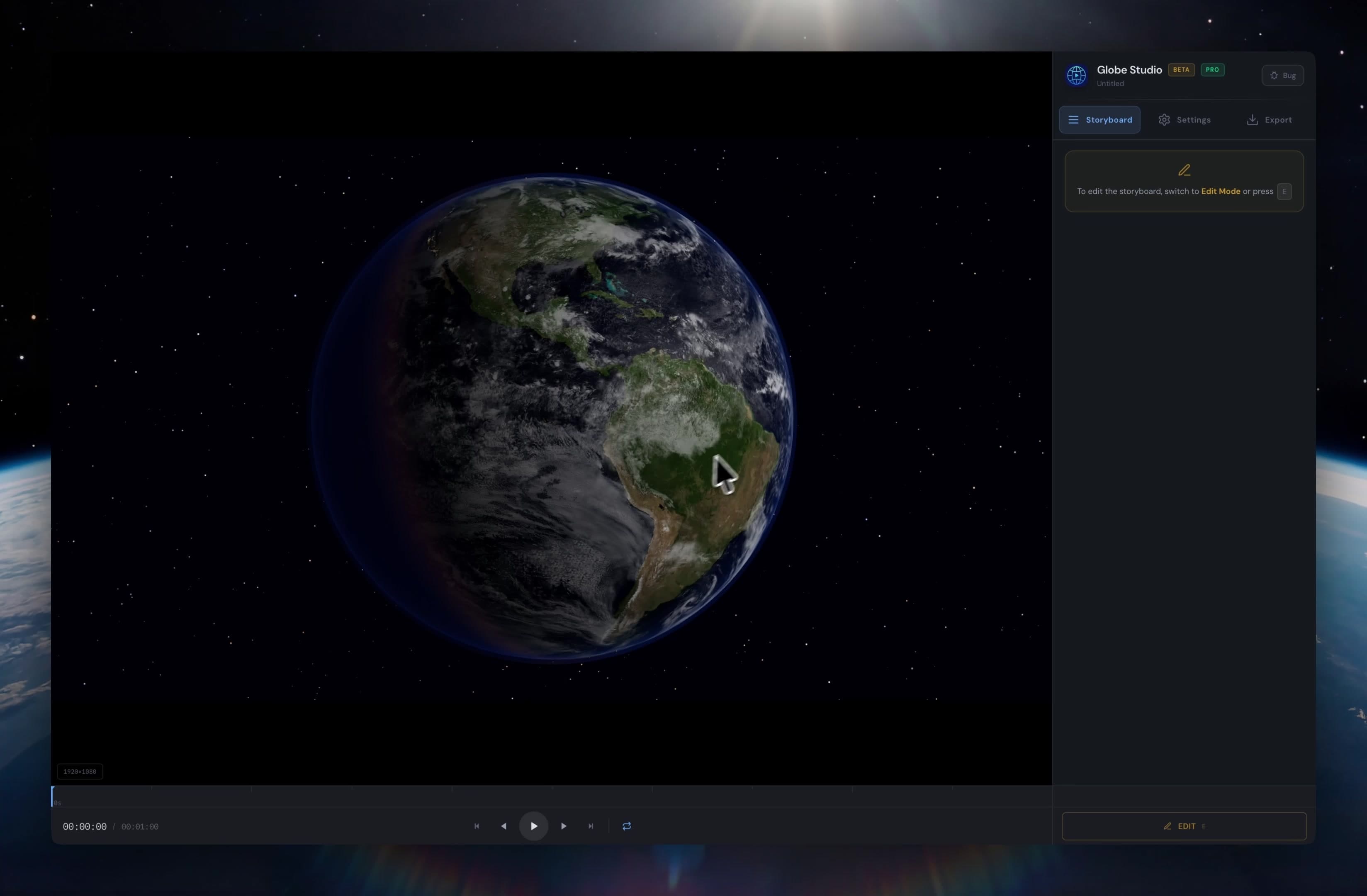
Globe Studio storyboard editor interface showing a 3D globe with Storyboard, Settings, and Export tabs in the right panel
Adding a second location creates an automatic animation path between the two stops. Globe Studio generates smooth camera transitions that follow the globe's curvature. The entire process works in real time — users see the animation preview immediately after placing pins.
Globe Studio supports two animation modes: Point-to-Point mode (storyboard-based, camera flies between stops) and Showcase mode (continuous globe rotation for ambient presentations). Transition timing, far distance, and close distance parameters are adjustable via sliders in the settings panel.
How Does Bulk Location Import Work?
Globe Studio includes a CSV import wizard for adding multiple locations simultaneously. The import dialog accepts data in the format: Name, Subtitle (optional), Latitude, Longitude. Users can also enter just city or country names — Globe Studio automatically resolves coordinates.
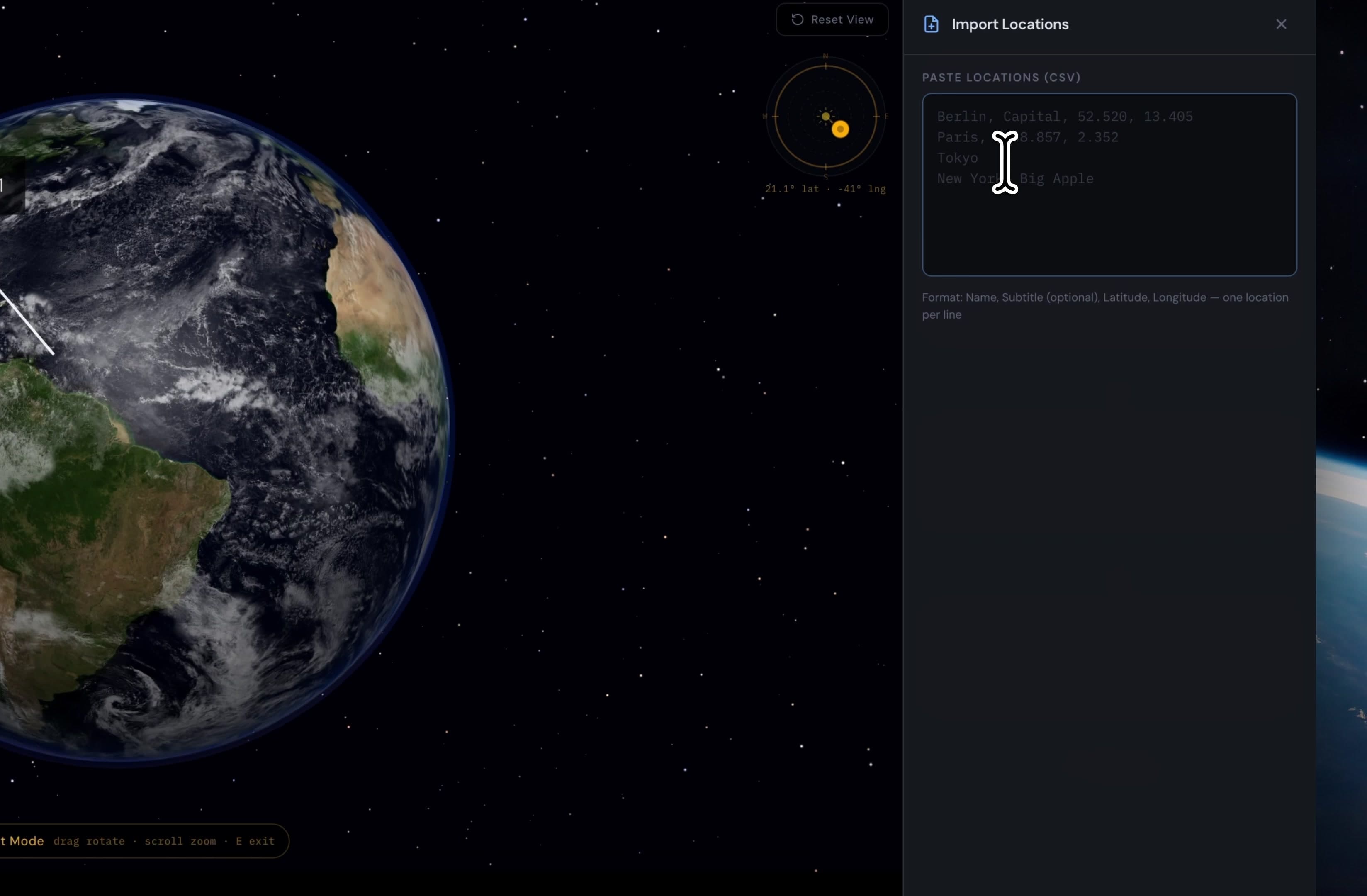
Globe Studio Import Locations dialog with CSV paste field showing Berlin, Paris, Tokyo, and New York entries with automatic coordinate detection
The automatic coordinate resolution eliminates manual latitude/longitude lookup. During the demonstration, Globe Studio correctly identified Berlin (52.520, 13.405), Paris, Tokyo, and New York from plain-text input. After applying the import, all locations appeared as pins on the globe with automatic connections.
What Planet Shaders and Textures Are Available?
Globe Studio provides three built-in planet texture options: Blue Marble (photorealistic satellite imagery), Natural Earth (terrain-focused cartographic style), and Political Map (country borders with distinct colors). Texture resolution is selectable at 2K, 4K, 8K, or 16K — though the 16K option requires significantly more VRAM.
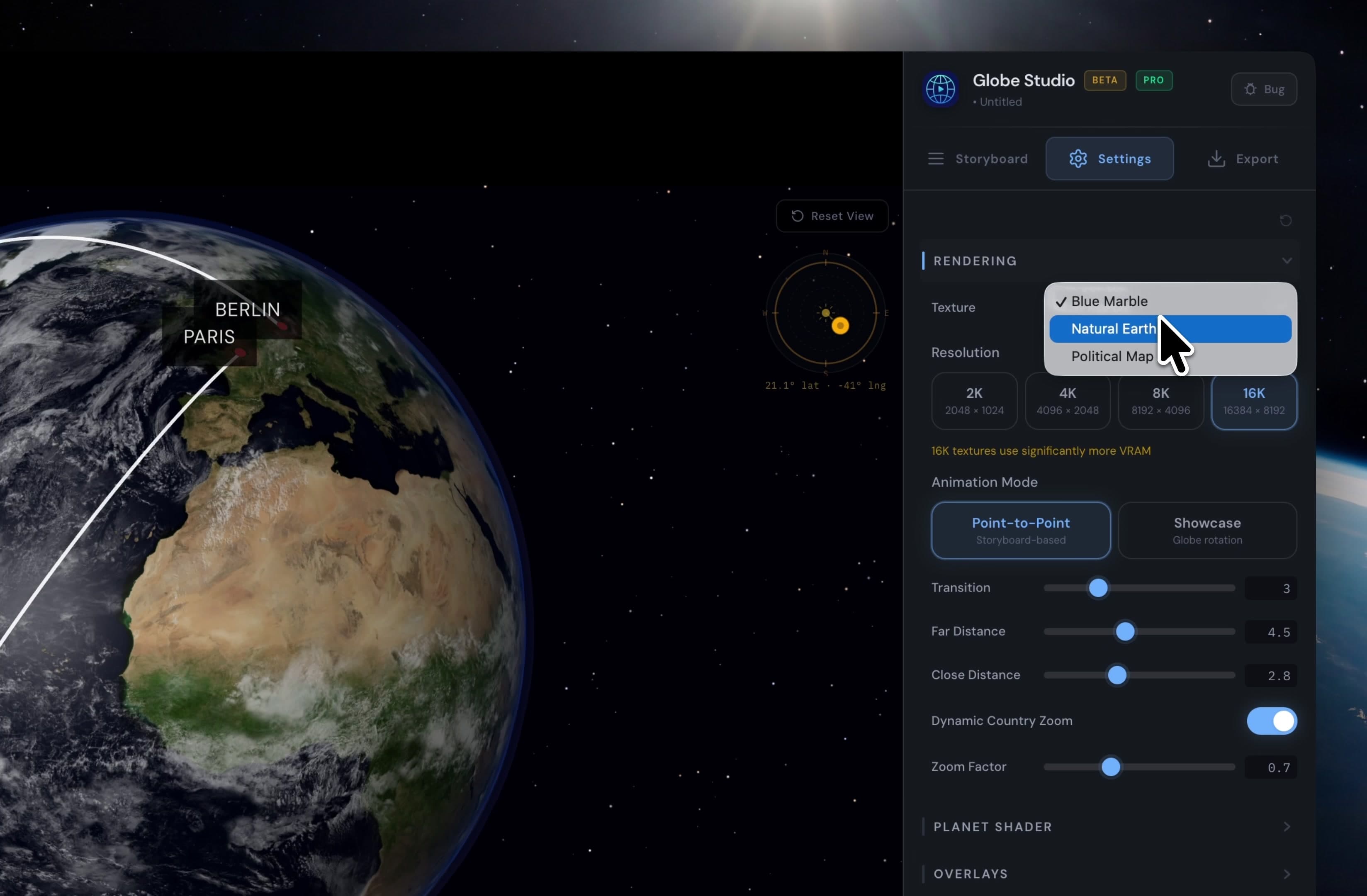
Globe Studio Settings panel showing texture selection dropdown with Blue Marble, Natural Earth, and Political Map options, plus resolution choices from 2K to 16K
Beyond the base textures, Globe Studio allows customization of the atmosphere, cloud layers, sunlight direction, and star background. The software also supports anamorphic lens flares by default. Users can convert these lens flares into standard (non-anamorphic) versions through the settings panel.
What Customization Options Does Globe Studio Offer?
Globe Studio exposes granular control over every visual element. The settings panel is organized into collapsible sections: Pins, Flight Arcs, Country Layer, Country Highlighting, Wave Effect, Graticule Grid, Stars & Background, Sun & Lighting, and About.
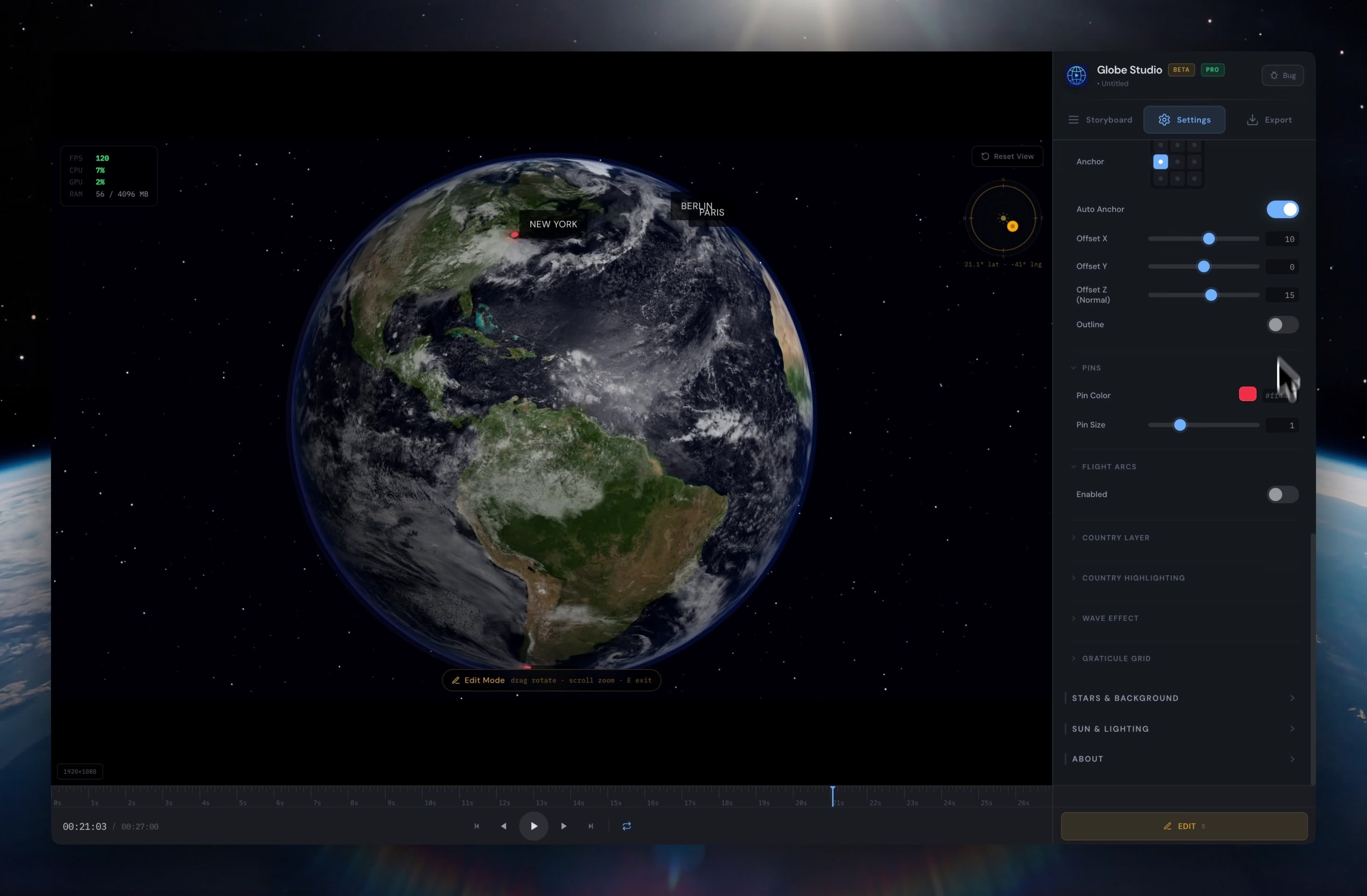
Globe Studio full settings panel showing all customization categories including Pins, Flight Arcs, Country Layer, Wave Effect, Graticule Grid, Stars and Background, and Sun and Lighting
Label customization includes font selection, font size, text color, and positioning offsets (X, Y, Z axes). Pin appearance is adjustable through color pickers and size sliders. These controls apply globally but produce per-stop visual differentiation when combined with the storyboard settings.
| Customization Category | Controls Available |
|---|---|
| Pins | Color, size, outline toggle |
| Labels | Font, size, color, X/Y/Z offset, auto-anchor |
| Flight Arcs | Height, thickness, opacity, color, line style (solid/dashed/dotted), dash/gap length, color gradient, trail fade |
| Country Layer | Enable/disable, borders, border color, border width, labels, label size, label color, label font |
| Country Highlighting | Per-country fill color and opacity |
| Wave Effect | Range indicator per pin location |
| Graticule Grid | Latitude/longitude line overlay |
| Stars & Background | Star density and appearance |
| Sun & Lighting | Sun position, lighting intensity, atmosphere glow |
How Do Flight Arcs and Country Layers Work?
Flight arcs in Globe Studio draw animated paths between location stops. Each arc supports customizable height, thickness, opacity, and color. Line styles include solid, dashed, and dotted variants. The color gradient and trail fade options create a visual direction indicator along the arc path.
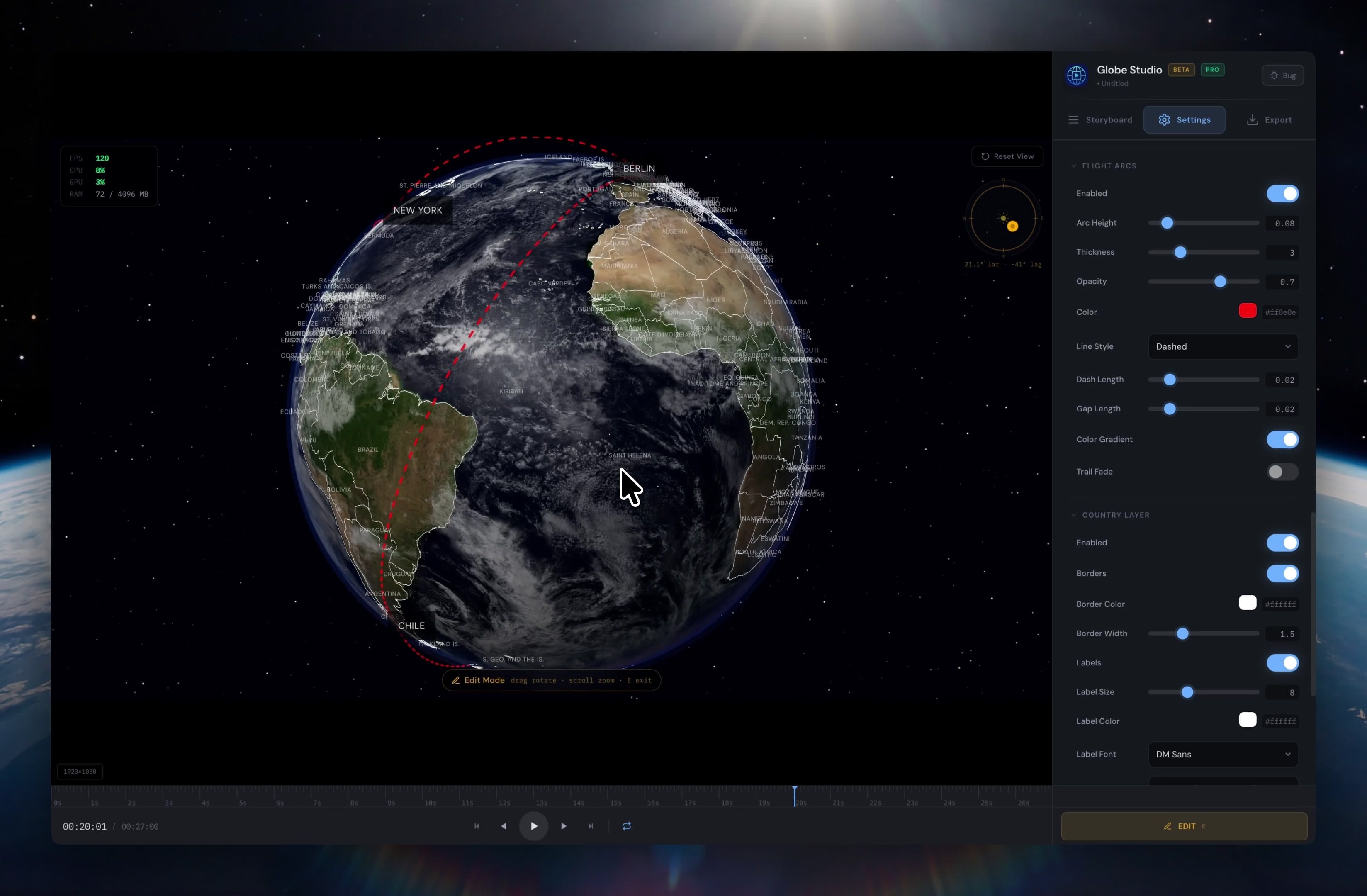
Globe Studio displaying dashed red flight arcs connecting New York, Berlin, Paris, and Chile on a 3D globe with country borders and labels enabled
Country layers enable border display for all countries with configurable border color, width, and label visibility. Country highlighting fills selected countries with custom colors — useful for visualizing market presence, political alliances, or geographic data. The wave effect adds an animated range indicator around pin locations, triggered for every stop in the storyboard.
The graticule grid overlays latitude and longitude lines on the globe surface. This feature is particularly useful for educational content where geographic reference lines provide additional context. All overlay features — flight arcs, country layers, graticule grid — can be combined freely.
What Export Options Does Globe Studio Provide?
Globe Studio exports video through a dedicated export dialog with precise control over frame rate, aspect ratio, resolution, and codec. The frame rate options include 24 fps (cinema), 25 fps (PAL), 30 fps (standard), 50 fps (PAL HFR), and 60 fps (smooth). Custom frame rates are also supported.
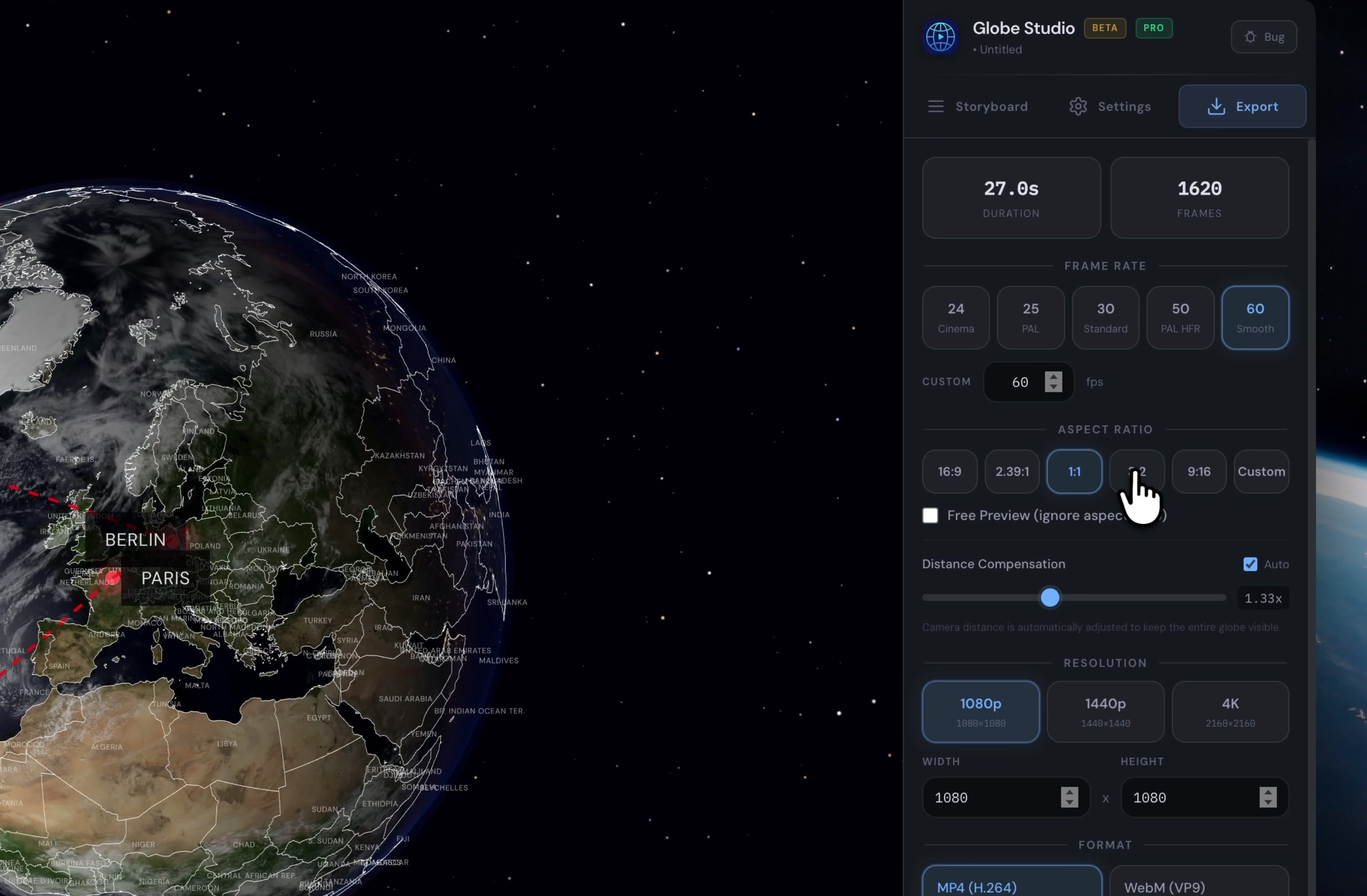
Globe Studio Export dialog showing 27-second duration at 1620 frames, 60 fps frame rate, 1:1 aspect ratio, 1080p resolution, and MP4 H.264 and WebM VP9 format options
Aspect ratio presets cover 16:9 (landscape), 2.39:1 (cinematic widescreen), 1:1 (social media square), 9:16 (vertical/mobile), and fully custom dimensions. Resolution options are 1080p, 1440p, and 4K. The distance compensation feature automatically adjusts camera distance to keep the globe fully visible at any aspect ratio.
The Pro version supports three video codecs: MP4 (H.264), H.265, and WebM (VP9). PNG image sequence export is available for users who need to composite globe animations in other software. Globe Studio uses an FFmpeg pipe optimization that renders significantly faster than frame-by-frame encoding.
Globe Studio vs. After Effects vs. Google Earth Studio vs. Blender
Globe Studio occupies a distinct position in the globe animation market. The following comparison evaluates Globe Studio against the three most common alternatives.
| Feature | Globe Studio | After Effects Templates | Google Earth Studio | Blender / Cinema 4D |
|---|---|---|---|---|
| Purpose-built for globe animations | Yes | Partially (template-dependent) | Partially (satellite imagery only) | No (general 3D software) |
| 3D skills required | None | Intermediate | None | Advanced |
| Standalone application | Yes | No (requires AE) | No (browser-based) | Yes |
| Flight arcs | Built-in, fully customizable | Template-dependent | Not available | Manual setup required |
| Country highlighting | Built-in with per-country colors | Limited | Not available | Manual setup required |
| Maximum export resolution | 4K | Unlimited | 4K | Unlimited |
| Cost | $19.99 one-time | $20–50/month + template cost | Free (Google account) | Free (Blender) / $94/month (C4D) |
| Time to first result | Minutes | Hours | Minutes | Hours to days |
Globe Studio's primary advantage is the combination of creative control and simplicity. Google Earth Studio is faster for satellite-imagery animations but lacks flight arcs, country highlighting, and custom shaders. After Effects templates offer more compositing flexibility but require a $20–50/month Creative Cloud subscription plus template costs. Blender provides unlimited 3D control but demands weeks of learning before producing a usable globe animation.
What Does Globe Studio Cost?
Globe Studio uses a freemium model with a one-time purchase upgrade. The free version provides full editor access, all styling options, and unlimited projects. The free version exports at 720p resolution with a watermark.
| Feature | Free | Pro ($19.99 one-time) |
|---|---|---|
| Full editor and preview | Yes | Yes |
| Storyboard and bulk import | Yes | Yes |
| Country highlights and arcs | Yes | Yes |
| Custom textures and lighting | Yes | Yes |
| Export resolution | 720p | Up to 4K |
| Watermark-free export | No | Yes |
| PNG sequence export | No | Yes |
| Full-quality codec export | 720p max | H.264, H.265, VP9 |
The $19.99 Pro license is a one-time payment that includes all version 1.x updates. Globe Studio does not use a subscription model. The license is delivered instantly via Gumroad and activated inside the application. Globe Studio currently runs on macOS. A Windows version is planned if demand is sufficient.
Frequently Asked Questions
Do I need 3D experience to use Globe Studio? Globe Studio requires zero 3D experience. The entire workflow uses a point-and-click storyboard editor. Users add locations, customize settings with sliders and dropdowns, and export video directly. No keyframing, no compositing, no 3D viewport navigation required.
How much does Globe Studio cost? Globe Studio offers a free version with full editing capabilities and 720p watermarked export. The Pro license costs $19.99 as a one-time payment, unlocking up to 4K resolution, watermark-free export, PNG sequences, and all v1.x updates.
What video formats does Globe Studio export? Globe Studio exports in MP4 (H.264), H.265, and WebM (VP9) formats. The Pro version also supports PNG image sequences for compositing in other software. Frame rates range from 24 fps (cinema) to 60 fps (smooth).
How does Globe Studio compare to Google Earth Studio? Google Earth Studio uses satellite imagery and requires a Google account with browser access. Globe Studio is a standalone desktop application with cinematic shaders, customizable flight arcs, country highlighting, and full export control. Globe Studio offers more creative flexibility for stylized globe animations.
Can Globe Studio bulk-import locations? Globe Studio includes a CSV import wizard. Users paste or type location data in the format Name, Subtitle, Latitude, Longitude. Globe Studio auto-detects coordinates for city and country names, eliminating manual coordinate lookup.
Conclusion
Globe Studio solves a specific problem exceptionally well: creating professional globe animations without 3D expertise or expensive software subscriptions. The storyboard-based workflow, real-time preview, CSV bulk import, and comprehensive customization options make Globe Studio the fastest path from concept to exported globe animation available in 2026.
The $19.99 one-time price undercuts every subscription-based alternative. For content creators, journalists, businesses, and educators who need globe visuals regularly, Globe Studio eliminates the choice between spending hours in After Effects or settling for generic templates.
Download Globe Studio for free → with full editor access. The Pro upgrade removes the watermark and unlocks 4K export.